Some of my agent work now runs inside herdr, a terminal workspace manager built around AI coding agents. Workspaces are like tmux sessions, tabs are like tmux windows, and each pane usually holds an agent. After a few days of that, the tab bar looks like this: every tab is called “1” or “2”, and every workspace is called “Tmp”. Tab completion by memory is not a workflow.
This is a mockup of what that looked like. Workspaces named after the folder they were opened in, tabs with default numbers, and nothing telling me where the current task lives:
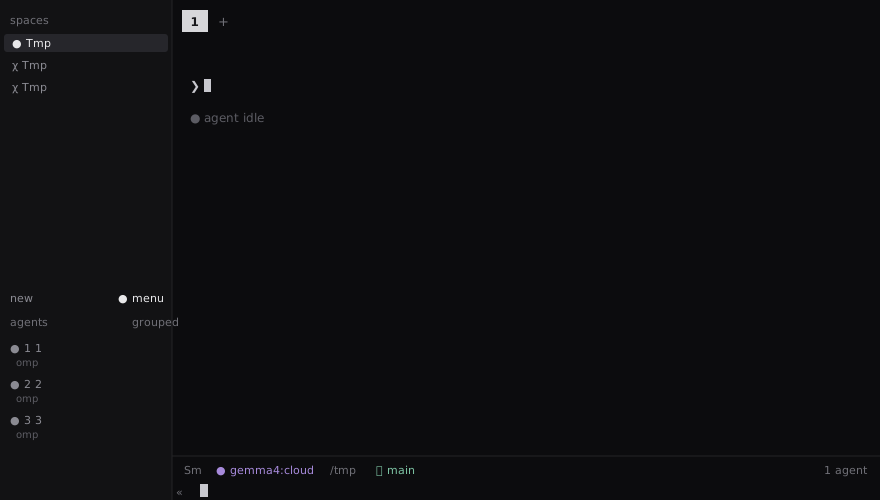
Herdr has a plugin that fixes this: herdr-tab-smart-rename by iurysza. It watches the session, samples the task evidence from your agent panes, and renames tabs and panes after what the agent is actually doing. This post covers the setup that worked for me and the three things I had to patch to get full value out of it, including making it rename workspaces too.
What the plugin does
The plugin runs a detached worker process next to the herdr server. The worker subscribes to herdr lifecycle events and also sweeps every ten minutes. For each tab it builds a bounded naming context: the project directory, the foreground process, a slice of recent terminal output, and the most recent user requests from the agent’s own session transcript. It sends that context to an OpenAI-compatible endpoint, validates the suggested label, and renames the tab and its panes through the herdr socket.
The context sampling is conservative. It reads transcripts from Pi (~/.pi/agent/sessions) and Claude Code (~/.claude/transcripts and ~/.claude/projects), and nothing else. Every request is byte-bounded. There is a churn gate on top: a model call only happens when the context fingerprint changed and at least ten minutes have passed since the last attempt for that target. A tab that produces no new evidence stops costing anything.
Setup
Installation is one command. --yes skips the source preview prompt, so read the manifest first if that matters to you.
herdr plugin install iurysza/herdr-tab-smart-rename --yesThen run the setup action, which walks through choosing a model source:
herdr plugin action invoke setup --plugin tab-smart-renameI picked the Direct source with Ollama, writing provider.env into the plugin’s private config directory:
# $(herdr plugin config-dir tab-smart-rename)/provider.env
SMART_RENAME_PROVIDER=ollama
SMART_RENAME_BASE_URL=https://ollama.com/v1
SMART_RENAME_MODEL=gemma4:cloud
SMART_RENAME_API_KEY=...        # chmod 600
SMART_RENAME_TIMEOUT_MS=45000
check-ai validates the provider without burning a rename, and measured a test completion at 0.57s against gemma4:cloud:
herdr plugin action invoke check-ai --plugin tab-smart-renameThe plugin also supports a custom prompt in naming-prompt.md in the same config directory. Mine pushes labels toward the concrete device or target being worked on and away from generic labels like “Build System” or “Run Tests”, which describe nothing six hours later.
One gap: the plugin has no startup hook, so the worker does not come back after a reboot until you invoke start. A systemd user path unit solves that by watching for the herdr socket:
# ~/.config/systemd/user/herdr-smart-rename.path
[Unit]
Description=Start Smart Rename worker when Herdr server socket appears

[Path]
PathExists=%h/.config/herdr/herdr.sock
Unit=herdr-smart-rename.service

[Install]
WantedBy=default.target
# ~/.config/systemd/user/herdr-smart-rename.service
[Unit]
Description=Start Smart Rename auto-naming worker for Herdr
[Service]
Type=oneshot
# mise-installed bun must be on PATH for the plugin's spawned commands
Environment=PATH=/home/dan/.local/share/mise/installs/node/26.8.1/bin:/usr/local/bin:/usr/bin
ExecStartPre=/bin/sleep 3
ExecStart=/usr/bin/herdr plugin action invoke start --plugin tab-smart-rename
RemainAfterExit=noThe PATH line matters. The plugin spawns bun for its commands, and a bare systemd user unit does not have mise’s shims. Without that line the worker start fails with a missing binary, not a helpful error.
Day-to-day controls are all actions:
herdr plugin action invoke status --plugin tab-smart-rename
herdr plugin action invoke rename-now --plugin tab-smart-rename   # current tab, forces a model call
herdr plugin action invoke rename-all --plugin tab-smart-rename   # every tab
herdr plugin log list --plugin tab-smart-rename --limit 10
The worker’s own log lives at ~/.local/state/herdr/plugins/tab-smart-rename/worker.log, with ownership state next to it in state.json.
Why nothing renamed on my machine
After setup, some tabs renamed and some never moved. The stuck tabs belonged to omp panes, which is most of my panes.
The cause was in the transcript sampling. Herdr reports each agent pane’s session file, and for omp that path is under ~/.omp/agent/sessions. The plugin’s allow-list only trusted Pi’s ~/.pi/agent/sessions and the Claude directories, so the omp path failed the containment check and the request sample came back empty. A tab with no user messages fell back to process-name heuristics, the model had nothing to name, and the churn gate made sure it never retried while the context stayed the same. The tab sat at “1” indefinitely.
The session format omp writes is the same JSONL shape the plugin already parses, so the fix was small: add an omp root and accept the path.
// src/pi-context.ts
function ompSessionsRoot(env: NodeJS.ProcessEnv): string {
  const agentDir =
    env.OMP_CODING_AGENT_DIR ||
    path.join(env.HOME || os.homedir(), ".omp", "agent");
  return path.join(agentDir, "sessions");
}

export function sessionAllowedRoots(pane, env): string[] {
  if (pane.agent === "claude") return claudeRoots(env);
  if (pane.agent === "omp") return [ompSessionsRoot(env)];
  return [sessionsRoot(env)];
}
paneSessionPath got the same treatment: accept agent === "omp" with a path session kind alongside Pi. With that in place, the stuck tab renamed itself on the next sweep, and kept renaming itself as the task evolved. Both renames landed in worker.log with timestamps I could check against what I had actually been doing.
Workspaces were locked out by design
Tabs were half the problem. The workspaces stayed at “Tmp” no matter what.
Two reasons, both intentional upstream. First, workspace targets never consult the model at all. The evaluation loop hardcodes their label from a deterministic candidate: the git worktree’s repo name if there is one, then the existing label, then the git root, then the pane’s folder name. That produces project names like “Portfolio”, which is reasonable, but it never produces “what am I doing right now”.
Second, the candidate logic treats any existing non-default label as the workspace’s identity. A default label means empty, numeric, or equal to the workspace number. “Tmp” is none of those, so “Tmp” was the identity, forever. On top of that, every workspace I owned was flagged manual in the plugin’s ownership state, which means protected, and manual targets are skipped before anything else runs.
I wanted workspaces to follow the same task evidence as tabs. The patch in src/service.ts gives workspace targets the same context path tabs get and tries the model first, keeping the deterministic name as the fallback when the model finds no task:
let label =
  target.kind === "workspace" || options.forceModel
    ? null
    : heuristic;
const needsModel = !label;
// after the model responds:
if (target.kind === "workspace" && !label) {
  label = workspaceName;          // deterministic fallback
  outcome.reason = "workspace identity";
}
The manual locks clear with the plugin’s own reset action, which I ran per workspace:
herdr plugin action invoke reset-workspace --plugin tab-smart-renameAfter restarting the worker, the spaces sidebar went from three “Tmp” entries to this:
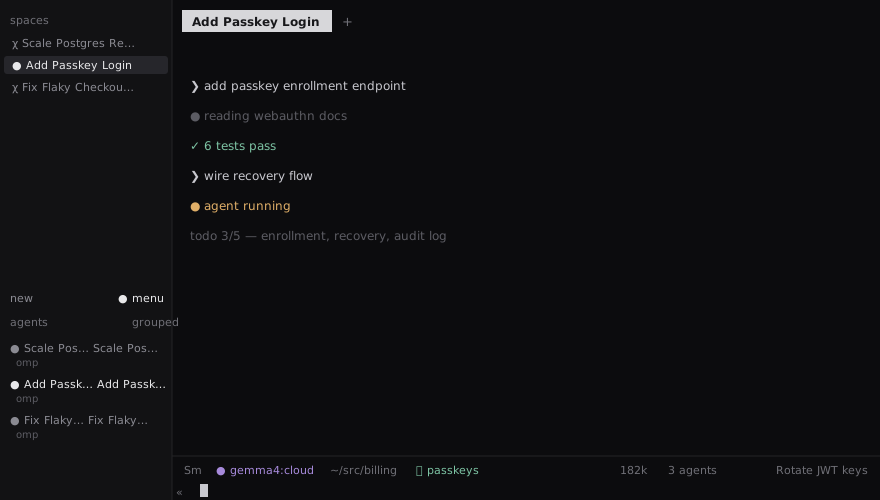
One trade-off to know about: with model naming on, a workspace’s name follows the tab that most recently evaluated it. I keep one main agent per workspace, so that is exactly the behaviour I want. If you keep several unrelated tabs in one workspace, the deterministic project names are probably the better fit.
The label validator
The suggested labels pass through a strict validator before anything is renamed: 2 to 4 words, at most 30 characters, and every word must start with an uppercase letter or digit. That is why “Migrate Auth To Passkeys” is a valid label and the model’s occasional “migrate auth to passkeys” is not. When the model returns a lowercase technical term, the whole rename fails and the tab keeps its old name until the next sweep.
Since the failure mode was casing rather than substance, I added a retry in parseSuggestion in src/provider.ts:
if (!validateTabLabel(output.tab)) {
  const normalized = titleCase(output.tab);
  if (!validateTabLabel(normalized)) {
    throw new Error(`invalid model tab label: ${JSON.stringify(output.tab)}`);
  }
  return { tab: normalized, reason: sanitizeText(output.reason) };
}
“Migrate Auth To Passkeys” comes back out of that retry, which passes and is good enough for a tab label.
Rules worth knowing
- Manual ownership wins. If a label was ever set outside the plugin, the target is protected until you run
rename-now,rename-all, or thereset-*actions. - The rate limit is ten minutes per target, and the model is only called when the context fingerprint changed. A stuck tab is usually a tab whose context never changes, not a dead worker.
worker.logrecords every rename with before and after labels, and every failure with a reason. Between that andstate.json(which holds the manual flags, auto labels, fingerprints, and attempt timestamps), every skip has an explanation.- The plugin’s own test suite ran 114 tests green after my patches, which caught me importing
titleCasewithout declaring it.
The catch
All three patches live in the installed plugin checkout at ~/.config/herdr/plugins/github/tab-smart-rename-c4dbca297d1d/. Running the installer again will replace that directory and revert to upstream behaviour until omp support and model-named workspaces land upstream. The diffs are small enough to reapply by hand, but the better path is upstreaming them.